 OpenFullPage
Twenty tools for capturing the web.
Free forever.
Grab a whole page, however long. Mark it up with arrows, text and numbered steps. Blur out what nobody else should see. Save it or copy it. All of it is in one small extension, and none of it costs anything.
- ✓No account, no sign-up, no trial that expires
- ✓No ads, no upsell, no paid tier holding tools back
- ✓Open source under GPL-3.0, the whole thing readable
- ✓Your captures stay on your computer, always
In short
The questions people actually ask, answered in a sentence each.
- What is OpenFullPage?
- A free Chrome extension that captures an entire web page as a single image, then lets you annotate, redact, crop and save it, all on your own machine.
- What does it cost?
- Nothing, permanently. There is no paid tier, no trial, no account and no advertising. It is open source under GPL-3.0.
- Where do my screenshots go?
- Your downloads folder, or your clipboard. Nowhere else is possible, because the extension has no network access at all.
- Does it upload anything?
- No, and it cannot. The manifest sets connect-src 'none', so Chrome itself refuses to carry any outbound request.
- Does it handle very long pages?
- Yes, that is its main purpose. It scrolls, captures each screenful and stitches one image, however far the page runs.
- What do I need to run it?
- Google Chrome 116 or newer, on Windows, macOS, Linux or ChromeOS. Nothing else, and no configuration.
Everything it does
Twenty tools, and you get all of them the moment you install. Nothing is held back for a paid version, because there isn't one.
- 01Full page of any length
- 02Visible area
- 03One element
- 04Sticky bars held still
- 05Waits for lazy images
- 06Iframe contents
- 07Arrows
- 08Lines
- 09Boxes
- 10Ellipses
- 11Highlighter
- 12Text
- 13Numbered steps
- 14Crop
- 15Undo
- 16Redo
- 17Blur out anything private
- 18Save as PNG
- 19Save as JPEG
- 20Copy to clipboard
Three steps, start to finish
Click the toolbar button. Everything after that happens on your machine.
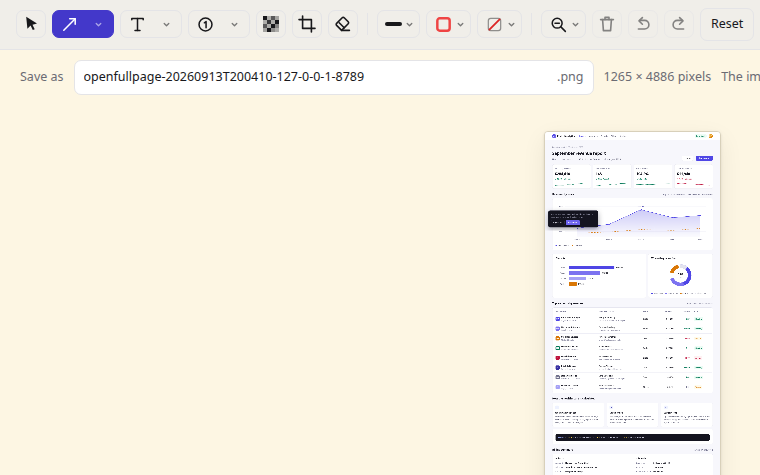
Capture
One click takes the whole page, however long it runs. Sticky headers stay put, lazy images get waited for, and the result is a single image.
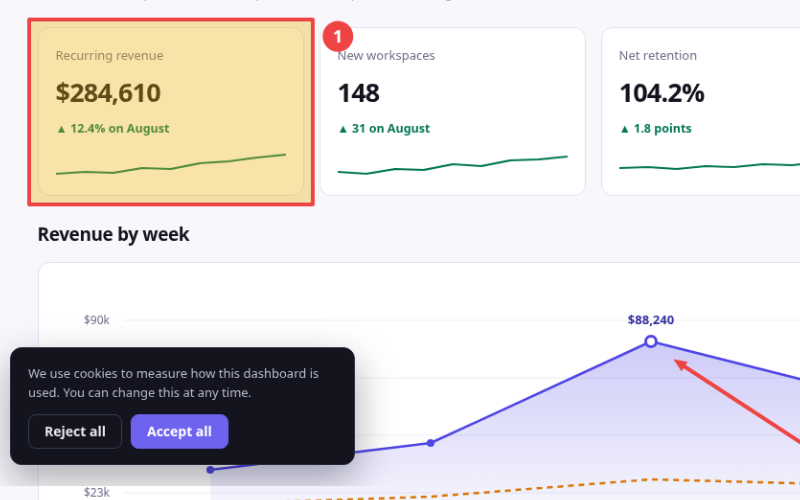
Mark it up
Arrows, boxes, ellipses, highlighter, text and numbered steps, right where the capture opened. Undo and redo as much as you like.
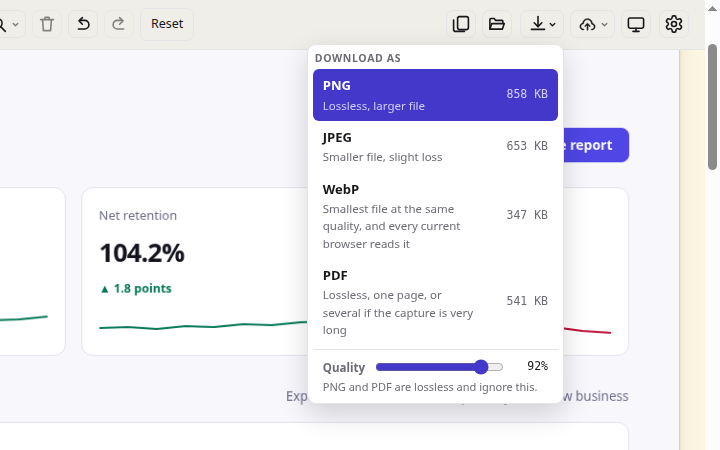
Save or copy
Name it, pick PNG, JPEG, WebP or PDF, and it lands in your downloads folder. Or copy it straight to the clipboard and paste it wherever you were headed.
Free, and safe to use
Screenshots catch whatever was on screen: inboxes, dashboards, client work. So OpenFullPage is built so none of it can go anywhere, and you can check that yourself.
- It cannot reach the internet The extension declares connect-src 'none', so Chrome itself refuses to carry any request it might try to make.
- Nothing is downloaded later No remote code, no update server, no configuration fetched from anywhere.
- Three permissions, not a blank cheque Reading the tab you clicked on, running the capture, remembering your settings. Saving asks the first time you save.
- Your settings never sync They stay on the machine that made them. Nothing is tied to an account, because there is no account.
- You can verify all of it The code is public, the package matches the source, and every one of these fails the build if it ever stops being true.
Capture a page with DevTools open and this stays empty.
See the five rules, every permission, and how to check them yourself →
Genuinely free. No catch.
Not free-for-now, not free-until-you-hit-a-limit. There is no paid tier, no company behind it selling your attention, and no reason for either.
- Every tool, from the first minute
- Chrome 116 or newer, on any OS
- Works offline, every single time
- GPL-3.0, fork it if you want
Specifications
Everything factual about the extension, in one place.
| Name | OpenFullPage — Screenshot, Annotate, Save |
|---|---|
| Category | Browser extension, screenshot and screen capture |
| Version | 1.10.1 |
| Platform | Google Chrome 116 or newer, Manifest V3 |
| Operating systems | Windows, macOS, Linux, ChromeOS |
| Price | Free, permanently. No paid tier, no trial, no account, no advertising |
| Licence | GPL-3.0-only |
| Permissions at install | activeTab, scripting, storage. downloads is requested on first save |
| Saves as | PNG, JPEG, WebP or PDF, or a copy to the clipboard |
| Network access | None. connect-src 'none' in the manifest |
| Dependencies | None. No build step; the package is byte-identical to the source |
| Account required | No |
| Works offline | Yes, always |
| Publisher | PalWorks |
| Source code | GitHub |
| User guide | Every tool, shortcut and setting |
| Policies | Privacy policy · Terms of use |
| Support | Support form or support@palworks.ai |
Questions
Yes. No paid tier, no trial, no account. It is open source under GPL-3.0 and always will be.
Your downloads folder, or your clipboard. Nowhere else is possible: the extension has no way to send them.
That is the main thing it does. It scrolls, captures each screenful and stitches one image, however far the page runs.
Blur it before you save. The blur resamples the pixels and flattens on export, so the original is not recoverable.
It only needs the tab you clicked on. Anything wider is optional, off by default, and you can take it back.
No. There is nothing to sign up for and nothing to log in to.
They are held still during capture, so they appear once at the top instead of repeating down the image. That repetition is what makes naive full-page capture unusable on many sites.
Yes. It captures whatever the tab is showing, so if you are signed in, it captures the signed-in page. Nothing about that page is transmitted anywhere.
PalWorks, which builds and open-sources small, privacy-respecting browser tools. The source is on GitHub under GPL-3.0.
Use the support form or write to support@palworks.ai. A person reads every message and replies by email, normally within one working day.